
Turning AI answers on and off
One switch, and one setting worth adjusting.
By HeyThula · Updated
AI answering is off until you turn it on, per workspace.
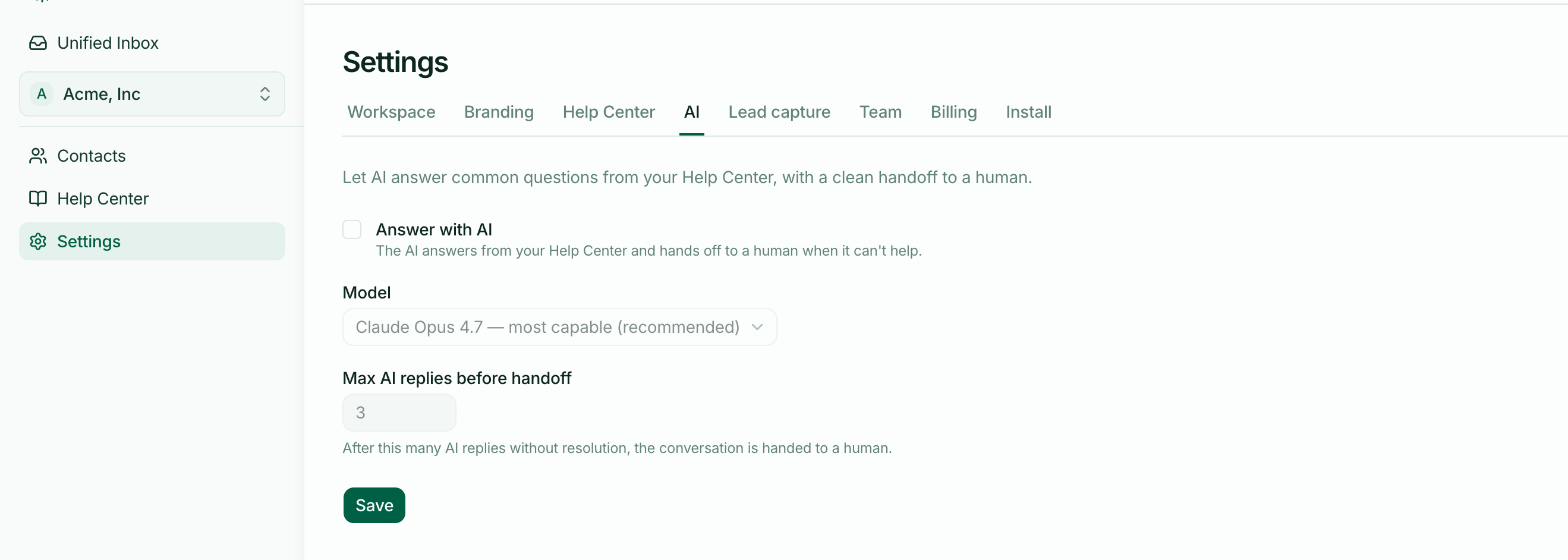
Turning it on
Settings → AI, tick Answer with AI, and save. It applies to the workspace currently selected — with more than one, each is switched on separately.
Publish a few articles first. The AI answers only from published articles, so on an empty help centre every conversation hands over. It works, but you'll conclude the AI is useless when it simply has nothing to read.
Max AI replies before handoff
The one setting worth thinking about. It caps how many times the AI can reply in a single conversation before passing it to a person. Three by default.
Lower it if you'd rather your team stepped in early. Raise it if your help centre is thorough and you're happy for the AI to keep trying.
Three is a reasonable default: enough for a question and a clarification, not enough for a customer to feel trapped in a loop.
Turning it off
Untick and save. The AI stops answering new messages immediately.
Conversations it has already handled stay exactly as they are — nothing is retracted, and anything already flagged Needs human is still waiting for your team.
Turning it off for one conversation
You don't need the setting for this. Replying yourself stops the AI in that conversation permanently — it won't add anything after a human has spoken. See When the AI hands over to a human.
Model
There's a model selector, defaulted to the most capable option. Most people should leave it alone; it's there for when you have a specific reason.