






Our help centre has 56 articles.An AI read our source code and wrote them.Go and read it →
HeyThula
Start free
A florist at her bench wrapping stems, her phone propped up beside her.
Support that gets cheaper every week

Your tickets tell you which docs are missing.
HeyThula writes them.

Then it answers with them — citing the article every time, and handing over honestly when there isn’t one yet.

50 resolutions a month, free forever. No credit card.
Bloom & Wild · 21:40, Friday
“Can I still change the delivery address for tomorrow?”
“Yes — until 8am on the day. Open the order email and hit ‘Change address’; the courier picks up the new one automatically.”
Changing a delivery address· cited, not invented
Nobody was awake to answer this. The article existed because the same question was missed three weeks ago.
AI · NOT A PERSONIt always says so. No invented names, no stock support agents.
Answering customers across every platform we run
VumasignHelloCrowdLomiiBlendyr&TeamLearn AppUhuru
How it works

A loop, not a chatbot. Each turn makes the next one cheaper.

Because the inbox, the help centre and the AI are one system, the gap gets labelled the moment it happens — not reconstructed later from a report.
WHAT GETS FILED“Can I move my subscription to a different card without cancelling first?” — stamped: no article covered this.
WHAT COMES OUTDraft article: “Changing the card your subscription is billed to” — 4 steps, 3 screenshots, clicked element highlighted.
WHAT THE CUSTOMER SEES“Billing → Payment method. Nothing cancels; your next invoice uses the new card.” · source: Changing the card your subscription is billed to
WHAT HAPPENS TO THE GAPThat gap: resolved by “Changing the card your subscription is billed to”, and off the backlog. If anyone asks it again, it comes straight back, tagged Recurring.

Every unanswered question becomes a labelled gap.

Because the inbox, the help centre and the AI are one system, each handover is stamped “the knowledge base couldn’t answer this” — next to the customer’s phrasing and your team’s reply.

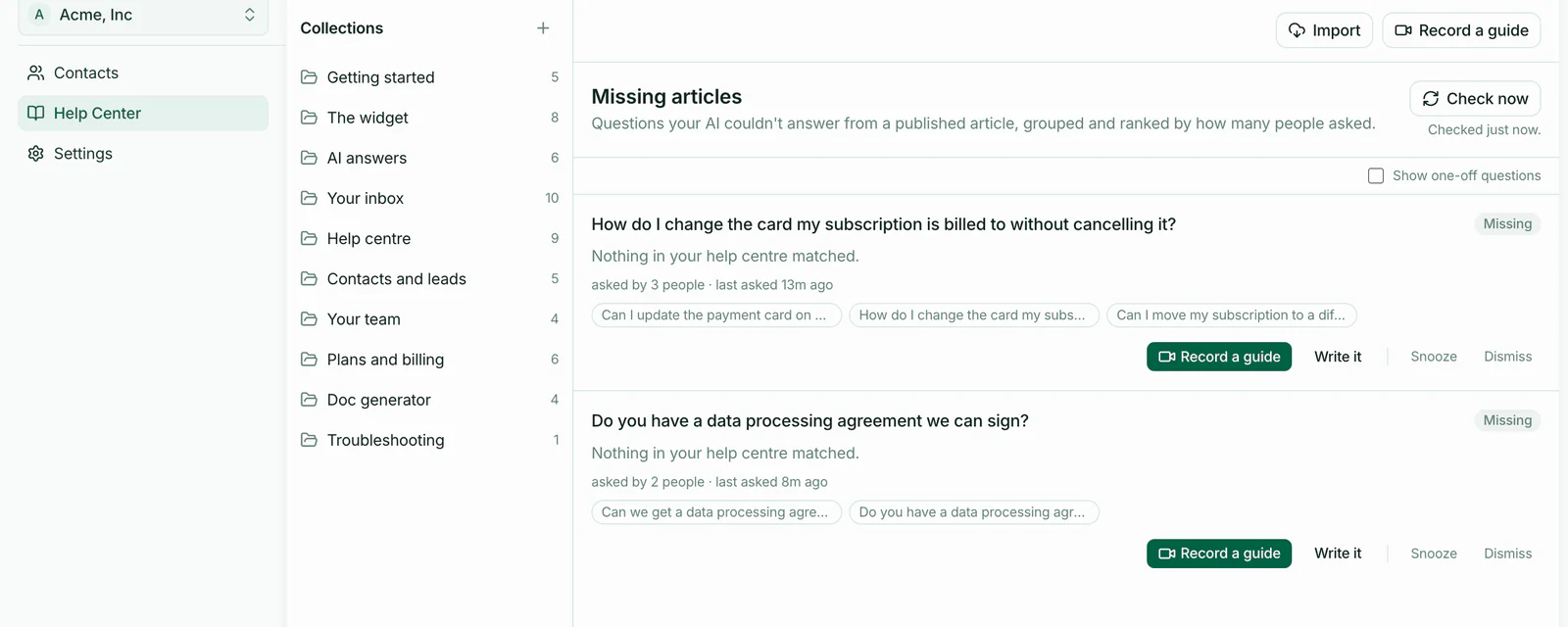
The Missing articles backlog in HeyThula: “How do I change the card my subscription is billed to without cancelling it?”, tagged Missing, asked by 3 people, with the three customers’ own wordings listed underneath; below it a second gap about data processing agreements, asked by 2 people.

Do the task once. It drafts the article.

The recorder follows you through your own product and writes the steps, with screenshots and the clicked element highlighted. Writing docs stops being a project.

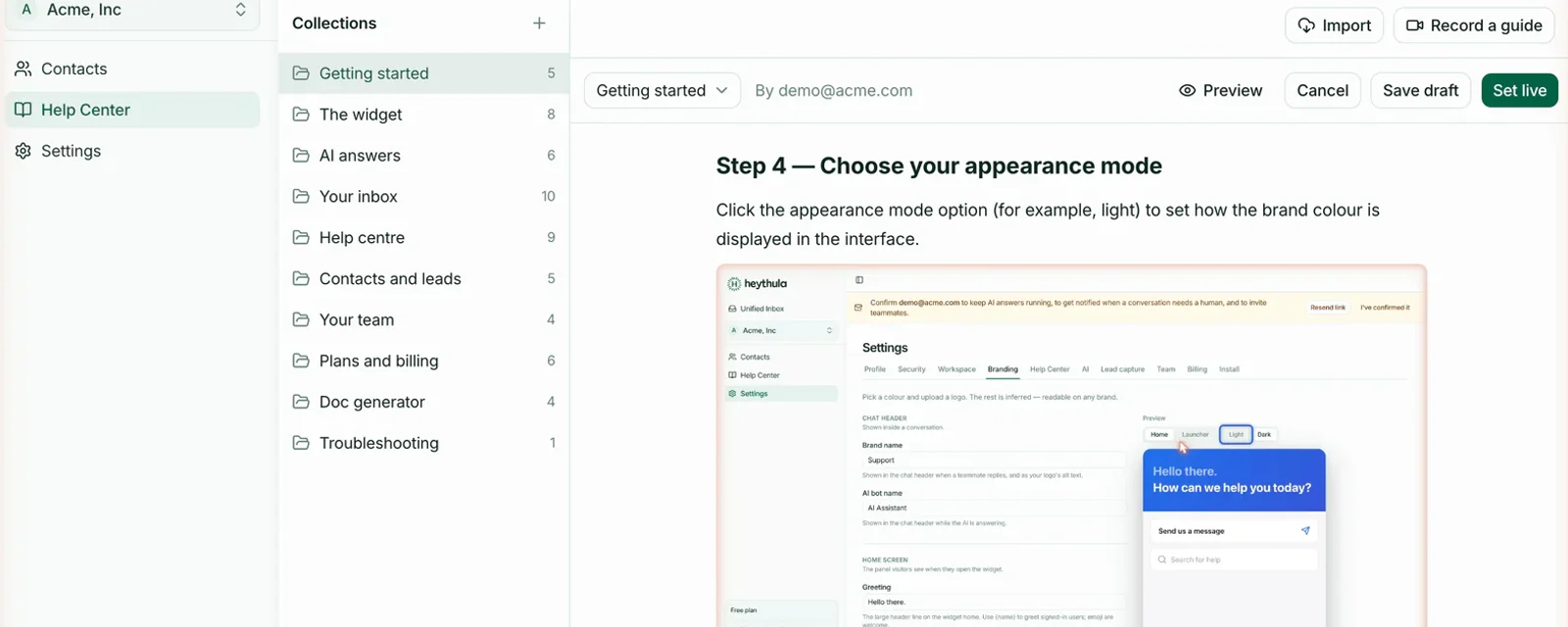
A guide the recorder wrote, open in the HeyThula editor: the step “Choose your appearance mode”, its instruction, and the screenshot captured at that click with a blue highlight box drawn around the button that was pressed.

Answers from your published articles, and only those.

The AI cites the article behind every reply, presents itself as an AI, and hands over when it can’t help. You can see which article produced each answer.

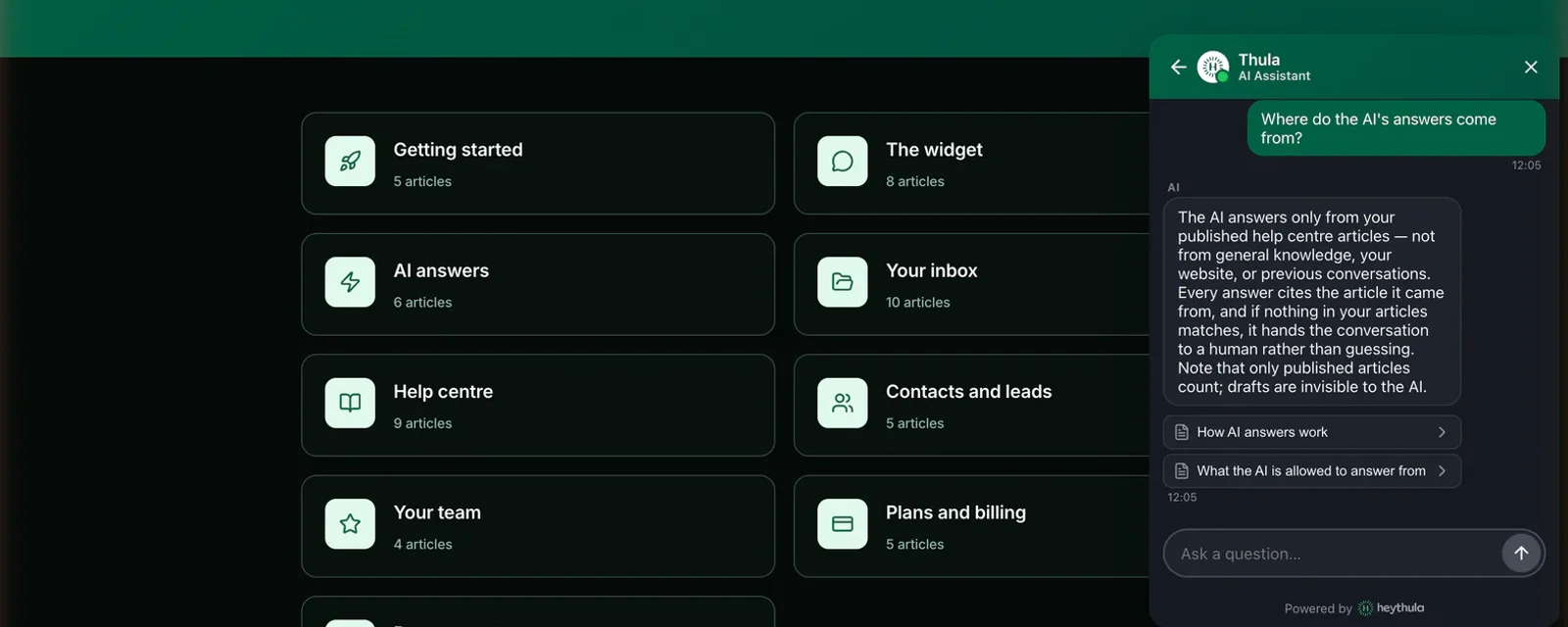
The HeyThula widget open on a help centre, answering “Where do the AI’s answers come from?” — and under the answer, two source chips naming the published articles it was drawn from: “How AI answers work” and “What the AI is allowed to answer from”.

Publish the article and the gap closes. If the question comes back, it reopens itself.

Publishing from a gap marks it resolved, and it leaves the Missing articles backlog. Only a question asked after you published brings it back — and when one does, it returns tagged Recurring, with how many times it’s been asked since. The loop checks its own work.

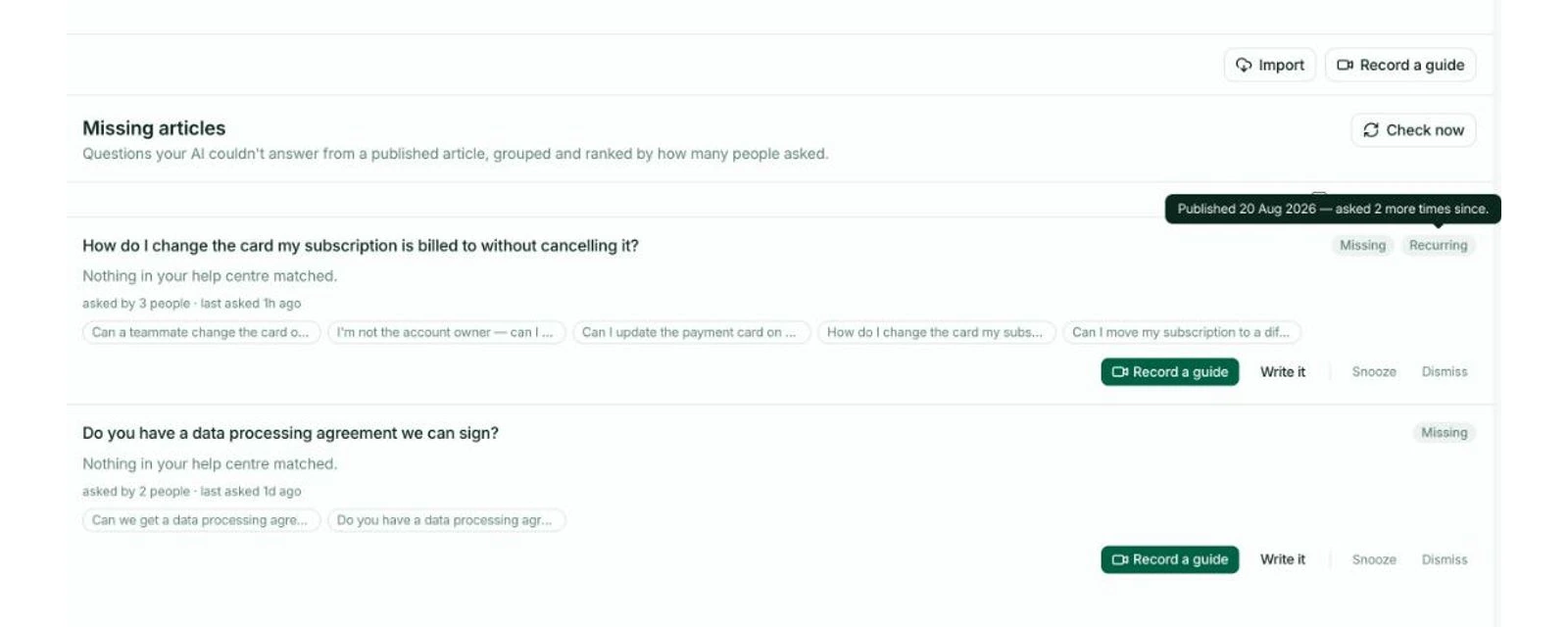
The same gap back in HeyThula’s Missing articles backlog after it was published: “How do I change the card my subscription is billed to without cancelling it?” now carries a Recurring chip beside Missing, and the tooltip open over it reads “Published 20 Aug 2026 — asked 2 more times since.” Underneath: asked by 3 people, last asked 1h ago, and the five question wordings clustered into it.
Try it here

Don’t take the paragraph’s word for it.

This is the same widget your customers would get, answering from our own help centre. It cites the article behind every reply, and it tells you when there isn’t one.

HeyThula assistant
AI · NOT A PERSON
What happens when the AI can’t answer?
It says so and hands the conversation to your team — no guessing. The question is recorded as a gap, in the customer’s own wording, with the human answer that followed.
Honest handover
Where do the answers come from?
Only from articles you’ve published. If it isn’t in your help centre, the AI won’t invent it, and every answer shows the article it came from.
Grounding and citations
Do I have to write the docs myself?
Do the task once on your own product with the recorder running. HeyThula drafts the article from it, with screenshots and the clicked element highlighted. You edit and publish.
Recording your first article
56articles in our own help centre, written by an AI that read our source code
0answers invented — it only replies from what you’ve published
1system: inbox, help centre and AI, which is why gaps get labelled
50resolutions a month on the free plan, forever
The proof is the product

This help centre wrote itself.

56 articles at heythula.com/docs. We didn’t write them in a docs sprint — an AI read this product’s source code and wrote all 56, we checked every claim against the running app, and we published them. They are also what the assistant on this page answers customers from. It’s the portfolio piece and the working help centre at the same time.

Read the docs →
When the AI hands over to a humanwritten from the sourceHow long changes take to appearwritten from the sourceHow usage is countedwritten from the sourcePublishing a generated articlewritten from the source
Switching

Already paying for a help desk that doesn’t do this?

See the full comparison →

You’re billed when the AI resolves it.

Hand it to a human and you’re not. A resolution counts once, when a conversation closes with no human involved — enforced in the code, not promised in a deck.

Free
$0/mo
50AI resolutions a month
Extra resolutionshard stop
Team members1
Workspaces1
Start free
ProMOST POPULAR
$39/mo
500AI resolutions a month
Extra resolutions70¢ each
Team members3
Workspaces2
Start free, upgrade to Pro
Scale
$129/mo
2,000AI resolutions a month
Extra resolutions50¢ each
Team members8
Workspaces5
Start free, upgrade to Scale
Every account starts on Free, with no card. Upgrade from Settings → Billing whenever you want more — nothing counts down, and Free doesn’t expire.
Agency$299/moRunning support for clients? 10,000 resolutions, 50 workspaces, 25 team members, 30¢ overage.
Start free, upgrade to Agency
Free stops. Paid never does.On Free, the AI pauses at 50 and hands everything to a human — the inbox, help centre, widget and team keep working, and it resets monthly. On paid plans you’re never cut off mid-month; overage is metered at your plan’s rate.
Upgrading always beats overage.Included resolutions work out at 7.8¢ on Pro, 6.5¢ on Scale and 3.0¢ on Agency, and the overage rate falls as the plan rises. If you’re paying overage regularly, the next plan up is cheaper. We’d rather say so than let it accrue.
Every feature, on every plan. Paid plans also remove our badge.We gate capacity, not capability. Our badge is the one exception.
AI answers grounded only in your published articles, with honest handover
Public help centre on your own subdomain, SEO-indexed, semantic search
The guide recorder — do the task once, get a drafted article with screenshots
Missing articles — the backlog of questions your docs don’t answer
Shared inbox, contacts and lead capture
Widget branding, light / dark / auto themes
Email notifications, in and out
Identity verification for logged-in users
Prices in USD. No annual plans and no sales tier — both would be inventions today.

The questions we get asked

The answering is the last step, not the product. The product is the loop: label what the AI couldn’t answer, draft the missing article from a recording of you doing the task, publish, and watch that gap close — it reopens itself if the question comes back. Bolt-on chatbots read whatever docs you happen to have. This one is trying to fix the docs.

Find out which articles you’re missing.

Point it at your inbox. Within a week you’ll have a list of the gaps, in your customers’ own words.

Start free — 50 resolutions a monthRead the docs