
When the AI hands over to a human
Every reason the AI stops and passes a conversation to your team.
By HeyThula · Updated
The AI answers what it can and steps aside when it can't. This article lists every reason it stops — so an unexpected handoff is something you can explain rather than guess at.
When it hands over, it posts a short message telling the customer a person will pick this up, marks the conversation Needs human, and adds to your unread count.
The five reasons it hands over
The customer asks for a person. Anything that reads as a request for a human — "can I talk to someone", "is anyone there" — hands over immediately, without consulting your articles. This is deliberate: someone asking for a person shouldn't have to argue with a robot first.
Nothing in your help centre matches. Before answering, the AI looks for relevant published articles. If nothing is a strong enough match, it hands over rather than improvising. It will not answer from general knowledge — see What the AI is allowed to answer from.
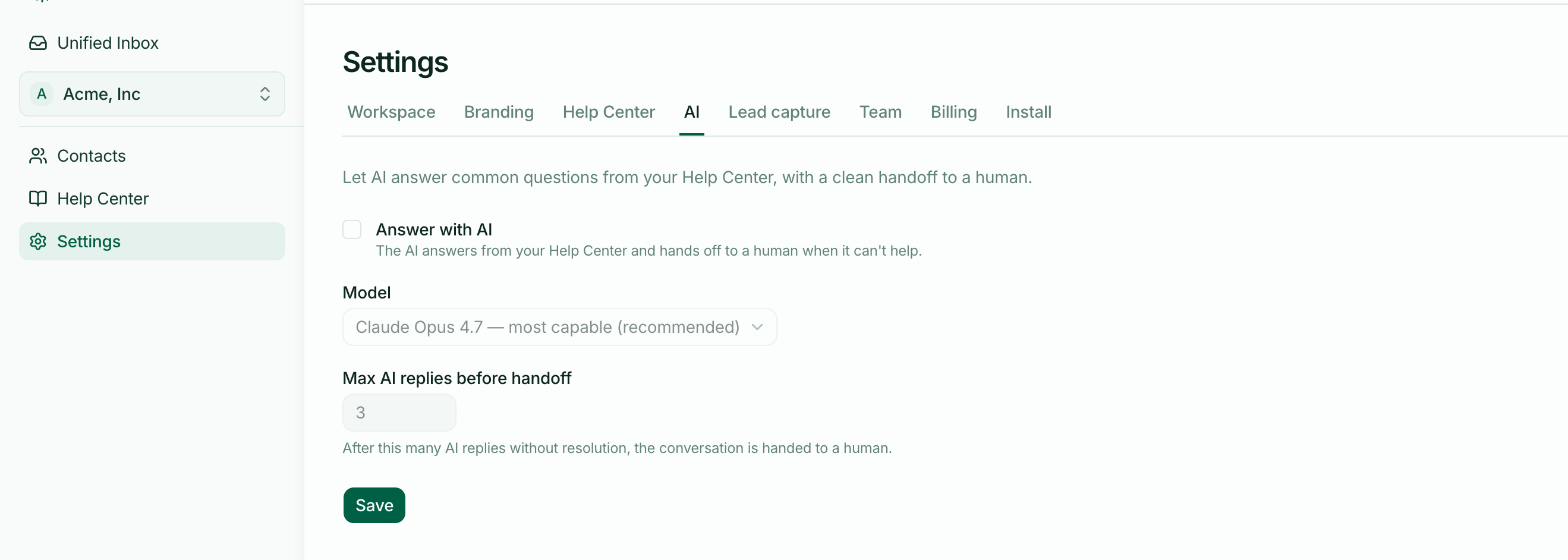
It has already replied too many times. Settings → AI sets Max AI replies before handoff — three by default. Once reached, the next message goes to a human. This stops a conversation looping between a customer who isn't getting what they need and an AI that keeps trying.
You're on Free and have used your included resolutions. At the cap the AI stops and every conversation goes to a human.
AI is switched off for the workspace — the Answer with AI toggle. Then nothing is automated at all.
What your customer sees
The same thing in every case: a brief message saying a person will take over. They are never shown a plan limit, a billing message, or anything about why the AI stopped. To them it reads as being passed to a colleague.
Once it hands over, the AI goes quiet
After a handoff the AI stops replying to that conversation entirely — including to further messages like "thanks" or "are you there". Without that, every follow-up would trigger another handoff message.
Only a human reply brings the conversation out of that state. When one of your team replies, the conversation is marked as human-handled and the AI stays out of it for good.
This is the most common surprise: a conversation sits in Needs human, the customer sends three more messages, and nothing automated happens. That's working as intended — it is waiting for a person.
Reasons it never replies at all
Distinct from a handoff — no message is posted, and the conversation isn't flagged:
A teammate has already replied, so the conversation is human-handled.
It is already flagged Needs human and waiting.
AI is switched off for the workspace.
When your account data is incomplete
If HeyThula can't read a clear "Free plan, at the cap" signal — a missing account link, or missing usage figures — the AI keeps answering rather than stopping.
The reasoning: a data problem on our side should never silently switch off your support. A cap only applies when we can positively confirm you're on Free and at your limit.
Reducing handovers
Most avoidable handovers are reason 2 — nothing matched. Each one is a gap in your help centre, so the conversations sitting in Needs human are a decent list of the articles worth writing next.
Remember that only published articles count. A draft that answers the question perfectly changes nothing until you publish it.