
Identifying logged-in users
Tell HeyThula who your signed-in users are, without letting anyone forge it.
By HeyThula · Updated
By default, everyone who opens your widget is an anonymous visitor. If people are already signed in to your product, you can tell HeyThula who they are — so their conversations follow them between devices, and your team sees a real name instead of "Purple Turtle".
Because that claim comes from a browser, it has to be signed. Otherwise anyone could open your site's console and claim to be one of your customers.
How it works
You send three things with the widget: the user's ID in your system (user.id), their details, and a user hash — proof that the claim came from your server, not from the browser.
The hash is an HMAC-SHA256 of the user's ID, keyed with your workspace's identity secret, hex-encoded. HeyThula computes the same hash and compares the two. If they match, the contact is marked verified.
Never compute the hash in the browser
The identity secret must stay on your server. Anything in your page source, a bundled JavaScript file, or a public environment variable is readable by anyone who visits your site — and someone holding your secret can impersonate any of your customers.
Compute the hash server-side, per request, and pass only the finished hash to the page.
Find your identity secret
Go to Settings → Install, to the section headed Identify logged-in users (optional), and choose Reveal identity secret.
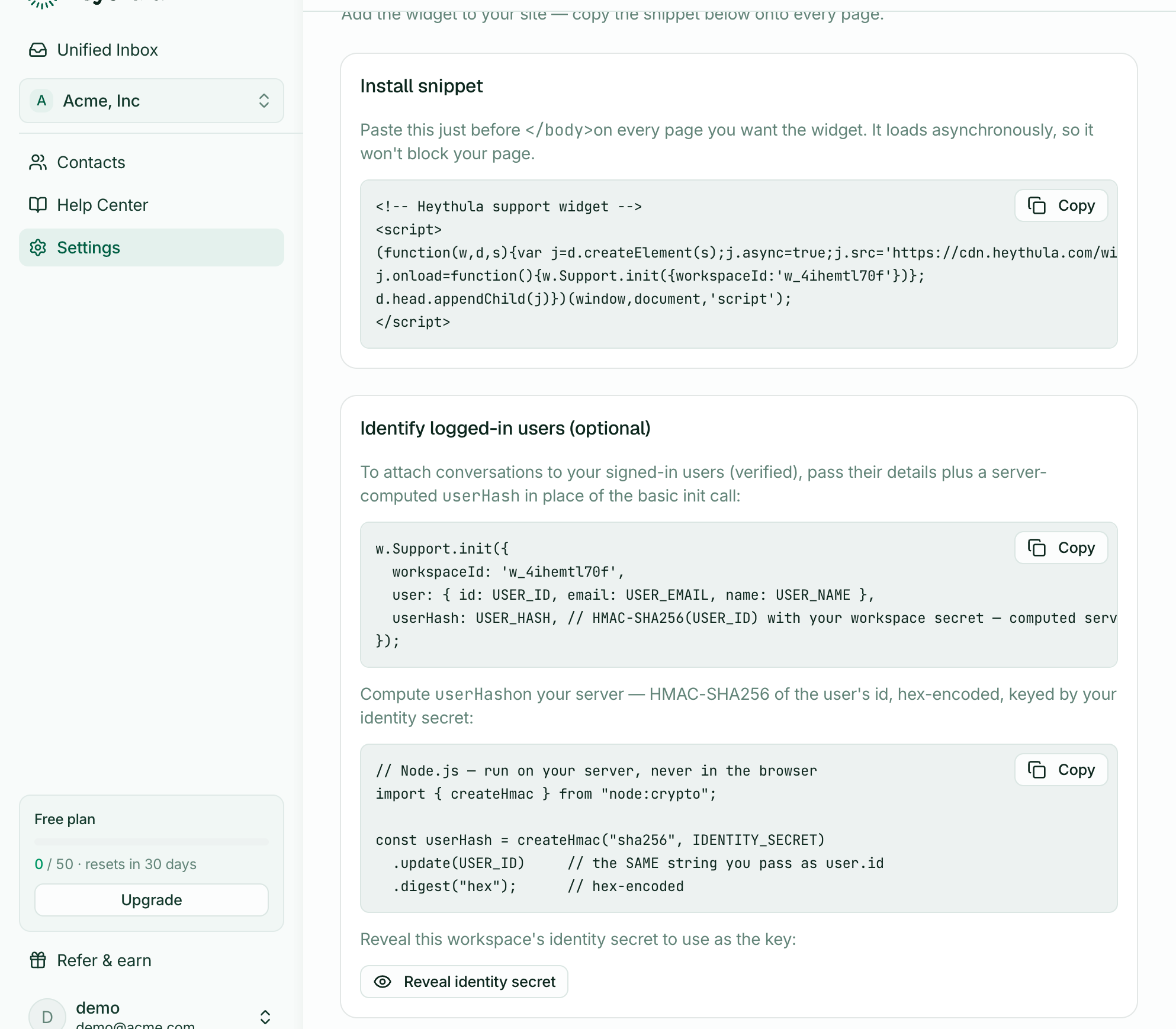
Treat it like a password. Anyone with it can forge identities in your workspace.
Compute the hash
Node.js:
import { createHmac } from "node:crypto";

const userHash = createHmac("sha256", process.env.HEYTHULA_IDENTITY_SECRET)
  .update(String(user.id))   // the SAME string you pass as user.id
  .digest("hex");
Ruby:
user_hash = OpenSSL::HMAC.hexdigest("SHA256", ENV["HEYTHULA_IDENTITY_SECRET"], user.id.to_s)Python:
user_hash = hmac.new(
    os.environ["HEYTHULA_IDENTITY_SECRET"].encode(),
    str(user.id).encode(),
    hashlib.sha256,
).hexdigest()
The message you hash must be exactly the string you pass as user.id. If you hash 42 and send "user_42", verification fails.
Pass it to the widget
Replace the basic Support.init call from your install snippet with one that carries the user's details and the hash:
<script>
(function(w,d,s){var j=d.createElement(s);j.async=true;j.src='https://cdn.heythula.com/widget.js';
j.onload=function(){w.Support.init({
  workspaceId: 'w_xxxxxxxxxx',
  user: { id: USER_ID, email: USER_EMAIL, name: USER_NAME },
  userHash: USER_HASH
})};
d.head.appendChild(j)})(window,document,'script');
</script>
The user's identifier goes in user.id, and userHash sits alongside user — not inside it. Your workspace ID and a copy-paste version of this snippet are on the Install tab.
What verification changes
Verified. The contact is marked verified and linked to your user.id. If HeyThula already holds a contact with that ID — from another device or an earlier session — the two are merged, and the conversation history from both comes together under the signed-in session.
Not verified. The conversation still works. The person stays an unverified contact, so nothing is merged and nothing is trusted. A missing or wrong hash never blocks someone from talking to you.
That is the deliberate trade: a broken integration degrades to anonymous chat rather than locking your customers out.
If verification isn't working
Check the hash covers the raw ID. Hash the same string you pass as user.id — no prefix, no email, no JSON.
Check the secret matches the workspace. Each workspace has its own identity secret. A secret from one workspace never verifies in another.
Check the secret hasn't been trimmed. Copy it whole; a truncated key produces a valid hash that simply never matches.
Check you're sending both fields. user.id and userHash are verified as a pair — either alone leaves the contact unverified. Note that userHash is a sibling of user, not a property inside it.
What HeyThula does not do
The identity secret is stored where browser code cannot reach it, and it is never sent to the widget. Your own team can't read it out of the product either, other than through the Reveal control above.
Hash comparison is constant-time, so a wrong hash reveals nothing about the right one.