
Sent, Delivered, Opened and Seen
What the small line under your reply is telling you.
By HeyThula · Updated
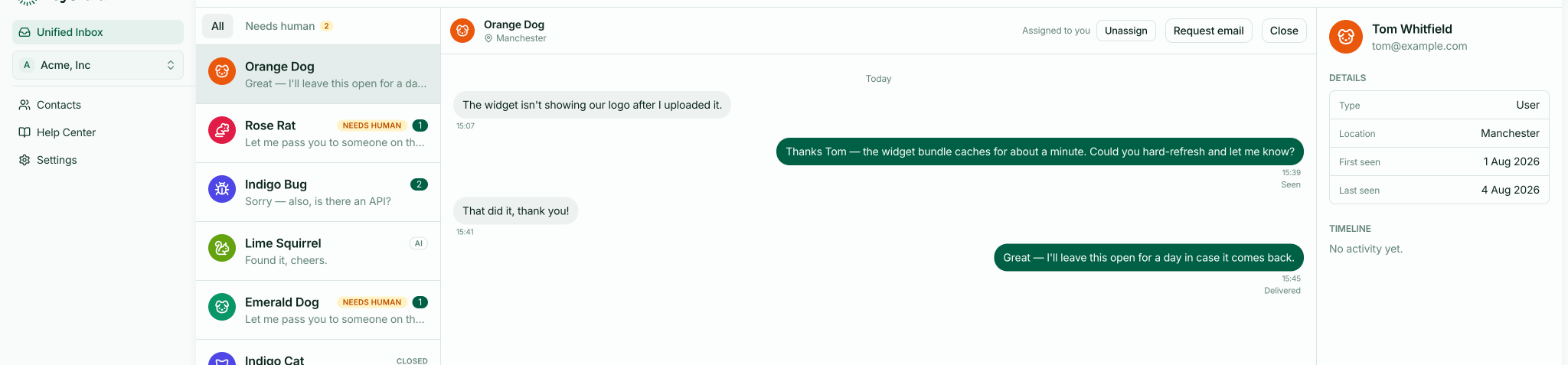
Under each of your replies, a short line reports how far it got. Some replies show one. Some show nothing at all, and that's usually good news.
What each one means
Seen — the visitor viewed the conversation at or after the moment you sent. They read it in the widget, on your site.
Opened — your reply was emailed to them, and they opened the email.
Delivered — the email reached their mail server, but they haven't opened it.
Sent — the email is on its way and hasn't been confirmed delivered yet.
Couldn't deliver — the email bounced. The address is wrong, full, or rejecting mail. This is the one worth acting on.
Seen outranks everything
If the visitor viewed the thread at or after your reply, the line reads Seen — even if an email was also sent and opened. Being read in the widget is stronger evidence than anything the email provider can tell us, so it wins.
No line at all is normal
Most replies show nothing, and that's the healthy case: the visitor was already looking at the conversation, so no email was sent, and they hadn't yet viewed the specific message.
HeyThula only emails someone who has actually missed a message. If they're present in the widget when you reply, there's nothing to notify them about — see Email notifications when you miss a message.
An absent line means "nothing to report", not "something went wrong".
Why there's no read receipt for email
Opened depends on the email being able to report back, which many mail clients block by default. Plenty of people read an email that never registers as opened.
Treat Opened as good news when you see it, and Delivered as the honest ceiling otherwise. Neither absence means your customer hasn't read it.
When to act
Couldn't deliver is the only state that reliably means something needs doing. The customer never received your reply. Check the email address on their contact record, and if it's wrong, follow up another way.
Everything else is informational.